Sports card scanner for iPhone
Scan a card.
See what it sells for.
SnapCard identifies baseball, basketball, football, hockey, soccer and Pokémon cards from a photo, shows what that exact card has recently sold for, and estimates its grade on the PSA scale before you pay a grader.
- collectors
- 200,000+
- languages
- 11
- (979)
- 4.6
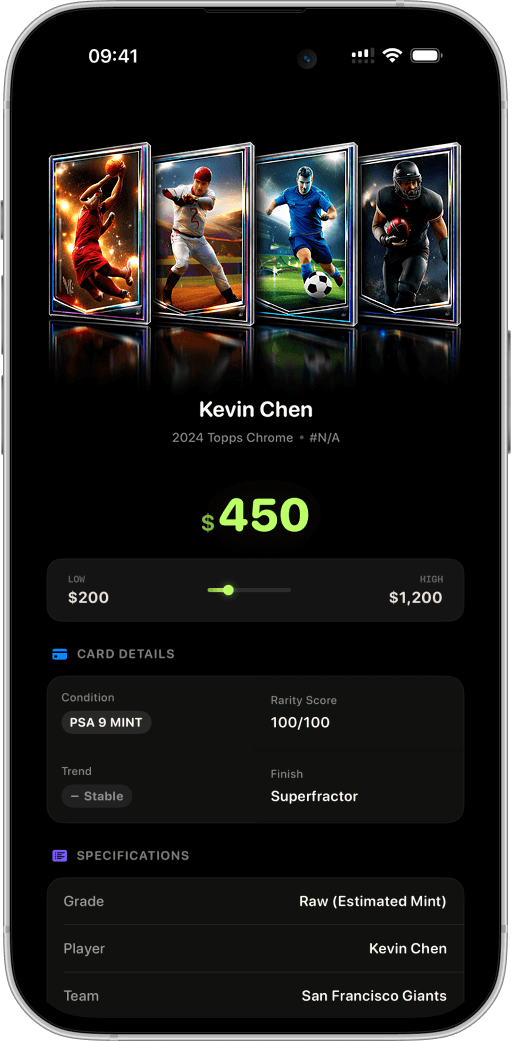
SnapCard is a sports card scanner app for iPhone. Photograph a card and it identifies the player, set, year, card number and parallel, then shows recent recorded sales from eBay, Goldin, Heritage, PWCC and Pristine, an AI condition estimate on the PSA 1 to 10 scale, and saves the card to a value-tracked collection.
Everything a collector checks, in one scan
Identification, pricing, condition and inventory used to be four tabs and a spreadsheet. Now they are one photo.
AI card identification
Player, set, year, card number and parallel from a single photo of the front. Add the back for a better condition read.
Recent sold prices
Recorded sales from eBay, Goldin, Heritage, PWCC and Pristine, with the average, low and high and a demand trend for the card.
PSA-scale grade estimate
An AI opinion on centering, corners, edges and surface, expressed from PSA 1 to PSA 10, next to what that grade sells for.
Graded slab reading
Point it at a PSA, BGS, SGC or CGC slab and it reads the company, grade and cert number off the label.
Collection and binders
Every scan is saved with its value. Search by player, set or number, sort six ways, and group cards into binders.
Portfolio value
Total value, card count, highest-value card and average, recalculated from current sales as the market moves.
Every major sport and the big three card games
The scanner is trained on sports cards from the 1950s to this year's releases, plus Pokémon, Magic: The Gathering and Yu-Gi-Oh!.
Sports cards
- Baseball
- Basketball
- Football
- Soccer
- Hockey
- Golf
- Tennis
- Boxing
- Wrestling
How to check a card's value in three steps
No account and no typing. The whole check takes about ten seconds.
- 1
Photograph the card
Open SnapCard, hold the phone over the card and let it find the edges. Add the back if you want a condition estimate.
- 2
Read the match and the price
The app names the card, shows recent sales for that exact version and gives the grade estimate with the reasons behind it.
- 3
Save it or sell it
Add the card to a binder with its value, or use the comps and the estimate to decide whether to list it raw or send it to a grader.
Why sold prices, not asking prices
A card is worth what someone paid for it, not what someone is asking. Marketplace listings sit unsold for months at prices no buyer accepts, which is why two searches for the same card can differ by a factor of ten. SnapCard builds its value from recorded sales at auction houses and marketplaces, and shows you the sales so you can judge them.
The same logic applies to grading. Whether a card is worth submitting depends on the gap between its raw price and its graded price at the grade it is likely to get. The app puts the estimate and the graded sales on the same screen, so the decision is arithmetic rather than a guess.
Free to download, Pro when you need more
SnapCard is free on the App Store. SnapCard Pro adds unlimited scans, the full condition analysis, the collection manager and iCloud sync, at $7.99 per week or $39.99 per year. Subscriptions are managed through the App Store and can be cancelled at any time.
Questions collectors ask
How does a sports card scanner app work?
It photographs the card, matches the image against catalogs of known cards to identify the player, set, year and parallel, then looks up recorded sales for that card. SnapCard adds an AI condition estimate on the PSA scale and saves the result to a collection.
Is SnapCard free?
It is free to download and try. SnapCard Pro, which unlocks unlimited scans, full condition analysis, the collection manager and iCloud sync, costs $7.99 per week or $39.99 per year through the App Store.
What cards can it scan?
Baseball, basketball, football, soccer, hockey, golf, tennis, boxing and wrestling cards, plus Pokémon, Magic: The Gathering and Yu-Gi-Oh! cards. It also reads graded slabs from PSA, BGS, SGC and CGC.
Can it scan Magic: The Gathering and Yu-Gi-Oh! cards?
Yes. Alongside nine sports and Pokémon, SnapCard identifies Magic and Yu-Gi-Oh! cards and prices the printing it matches, so check the set code on the card against the result. Reprints and foil versions are listed separately because they sell at different prices.
Where do the prices come from?
From recorded sales on eBay, Goldin, Heritage Auctions, PWCC and Pristine Auction. Values are estimates built from those sales and can differ from what a card sells for on a given day.
Does it work on Android?
SnapCard is an iPhone and iPad app and requires iOS 17 or later. There is no Android version at the moment.
Find out what your cards are worth
Scan the first card in under a minute. No account, no typing, no guessing.
Download on the App StoreFree on the App Store. Requires iOS 17 or later.