Skip to content

Your binder, with prices attached

A card collection tracker that keeps the spreadsheet updated for you

Most collectors keep a spreadsheet with a Value column they last touched in 2024. SnapCard replaces it. Each card you scan is saved with its identification and its recent sold price, filed into a binder and rolled into a portfolio total, so the number at the bottom reflects the market rather than your memory.

A card collection tracker records every card you own together with its current value. SnapCard builds that record from scans: each card is saved with its player, set, card number and recent sold prices, filed into binders, searchable by player or set, and totaled into a portfolio value with a card count, highest-value card and average per card.

Start your collection

4.6 ★ on the App Store from 921 ratings

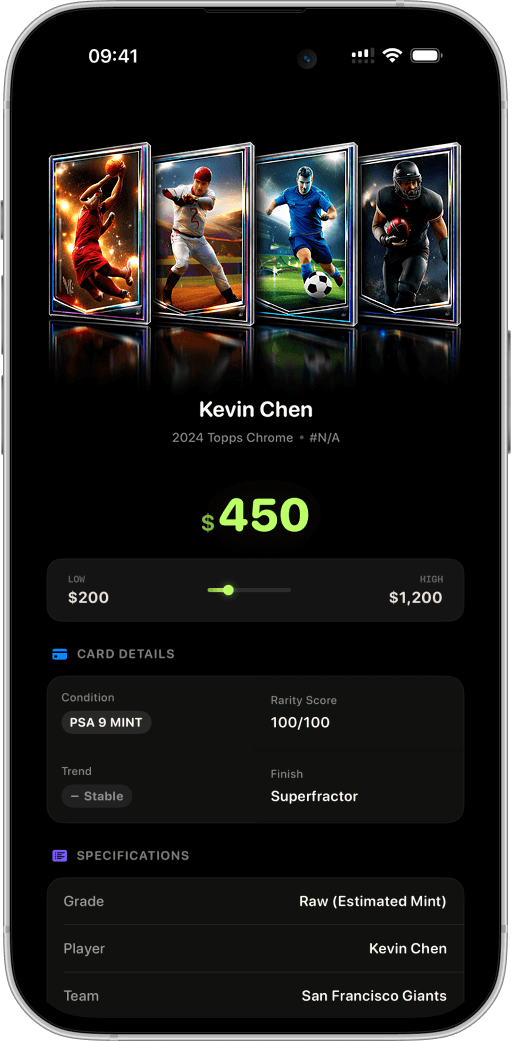
SnapCard card collection tracker showing binders, a portfolio total and a searchable list of scanned cards

From shoebox to inventory, one card at a time

Each card gets its own capture; there is no way to photograph a nine-pocket page and log all nine. Slower, and far more accurate.

  1. 1

    Capture one card

    Photograph the front, add the back if you want the condition estimate to see the corners, and the card is identified. Parallel, grade if slabbed, and the latest sold prices attach to it automatically.

  2. 2

    File it in a binder

    The app suggests a binder from what it just identified, so a 2024 Topps Chrome card is offered a 2024 Topps Chrome binder. Accept it, pick another, or create a new one.

  3. 3

    Watch the total move

    The collection screen totals every saved card, counts them, and names the highest-value card and the average. Add a purchase price and date and each card carries its own cost basis.

What the spreadsheet never did

A spreadsheet is a fine place to record a card and a poor place to record its value. The value column is only right on the day you typed it, nobody retypes it for 400 cards, and a wrong card number stays invisible until you try to sell. SnapCard fills every field from the scan and ties the value to recorded sales, so the inventory stays right without you maintaining it.

The trade-off is scope. The app tracks what you scan into it, and there is no CSV export today, so SnapCard is the record rather than a feed into another one.

What every saved card records and where it comes from
FieldWhere it comes from
Player, set, year, card number, parallelIdentified from the scan
Grade and cert numberRead from a PSA, BGS, SGC or CGC slab; a raw card gets a PSA-scale estimate instead
Current valueRecent sold prices, or a manual price you set to override them
Purchase price and dateEntered by you, so the card knows what it cost
Sold date and priceEntered by you when the card leaves the collection
BinderSuggested from the scan, or chosen by you

Search, sort and binders

Type a player, a set name or a card number and the collection narrows to the matches. Six sort orders rearrange the list, so the same 800 cards can be read as a value ranking or as a set checklist without building a second sheet.

Binders are folders, and the app proposes one for each scan based on what it identified. Keep the suggestion or file the card wherever it belongs.

  • A binder per set build, so all of 2024 Topps Chrome sits together
  • A binder per player collection, from a 1989 Upper Deck Ken Griffey Jr. onward
  • A For Sale binder for cards you have decided to move
  • A Graded binder for slabs, which arrive with grade and cert number already read
  • A binder per family member sharing the same iPad

Cost basis, sale price and manual overrides

A collection is only a portfolio if it knows what you paid. Enter a purchase price and date on any card and the app keeps it beside the current value, so a $40 pickup shows what it cost and what it is worth on the same screen.

When a card sells, record the sold date and price instead of deleting it. The card stays as a record of the sale, which you will want in 2027 when you cannot remember whether the Wembanyama went for $180 or $280.

If the comps are thin or the card is an oddball the market data misses, set a manual price. The override replaces the sold-price figure for that card, and you can return to market data later.

Why a valued inventory matters

Homeowner's and renter's policies typically cap collectibles at $1,000 to $2,500 as of 2026 unless the items are scheduled, and scheduling requires an itemized list with values. A collection where every card carries an identification, an image and a recent sold price is that list, ready before the adjuster asks for it.

The same inventory answers the selling question. Sorted by value, most collections turn out to hold their money in fewer than 5 percent of the cards, and those are the ones worth grading, insuring or listing first. The rest can stay in the box with a clear conscience.

What the tracker does not do yet

There is no CSV or spreadsheet export today, no price alerts and no push notifications when a value moves. Scanning needs an internet connection, though the saved collection can be browsed offline. iCloud sync between iPhone and iPad is part of SnapCard Pro, and none of it requires an account or a sign-in.

Sort orders in the collection
6
Card per scan, front plus optional back
1
Sync between iPhone and iPad with Pro
iCloud
Accounts, passwords or sign-ins
0

Questions about tracking a card collection

is there an app to track my card collection value

Yes. SnapCard saves each scanned card with its identification and recent sold prices, then totals the collection into a portfolio value with a card count, the highest-value card and the average. Open the collection to see the current figure.

can I export my card collection to a spreadsheet

Not today. There is no CSV or spreadsheet export in the current version, so the app is the record itself. Purchase price, sold price, binder and manual overrides all live inside the collection.

does the card collection tracker sync between iphone and ipad

With SnapCard Pro, yes. The collection syncs through iCloud, so a card scanned on the phone appears on the iPad without an account, a password or a sign-in. The free version keeps the collection on one device.

how do I track what I paid for a card

Open the card in your collection and enter the purchase price and purchase date. Both stay attached to the card beside its current value, and when you sell, add the sold date and price so the history is complete.

does the app alert me when a card price changes

No. There are no price alerts and no push notifications. Prices refresh as you use the app, so the way to check a card is to open the collection and look at it.

is the card collection tracker free

SnapCard is free to download and the collection is part of the app. Pro, at $7.99 a week or $39.99 a year, adds unlimited scans and iCloud sync across devices.

Put the spreadsheet away

Scan the cards, let the binders fill, and check the total whenever you want to know what the collection is worth.

Download SnapCard free